Use Case · Lead Management

How Acquisitions works inside DataSift.

After working alongside 250+ investors running six and seven figure operations, we built the acquisitions workflow that keeps every offer moving from Lead Management handoff to signed contract.

How Offers Move Through DataSift

From the moment a lead is ready for an offer to the moment it hits the Transactions Board every step is tracked, every offer is followed up with.
1
New Offer Phase
2
Offer Follow-Up Phase
3
Contract Phase
STEP 01 / 03
Step 1
New Offer Phase
A qualified lead is passed from Lead Management and ready for an offer.
Lead Manager moves the record to "Send to Acquisitions" column on the SiftLine Board.
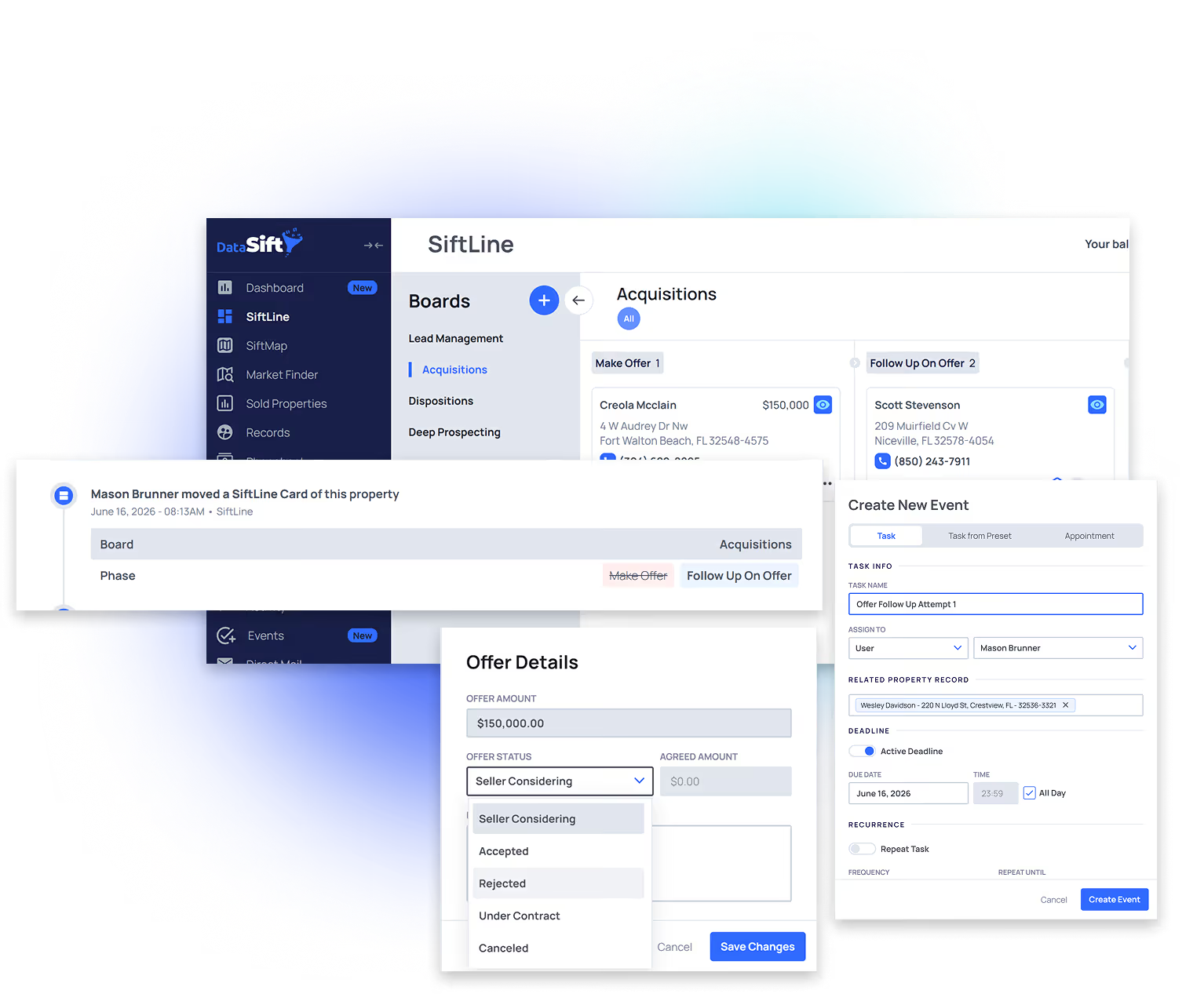
A Sequence fires automatically → The property card lands on the Acquisitions Board with a Make Offer task already assigned.
Acquisitions opens the record and reviews the activity log and reviews last sale, AI score, equity, and owner profile are already on the record.
Now Acquisitions can run comps in SiftMap and in the Sold Properties tab
Acquisitions makes offer. Offer get logged in DataSift → activity log stamps date, time, and amount automatically.
Previous
Next step
STEP 02 / 03
Step 2
Offer Follow-Up Phase
An offer is out. AQS works it to a decision with consistent follow-ups.
Seller says "let me think about it" → Update offer to Considering → Day 1 follow-up task fires automatically.
Follow up days 1, 2, 3, and 5. Call or text each time. If they need more time apply the task, change the due date.
Offer rejected → Update to Rejected → task auto-creates for Lead Manager to recycle the record back into the lead cycle.
No decision after one week → contract expires. Restart the offer. The record never disappears.
Keep sending direct mail to every open offer until the contract is signed — verbal acceptance is not a deal.
Previous
Next step
STEP 03 / 03
Step 3
Contract Phase
Seller verbally accepts. The system routes the deal to Transactions.
Verbal yes → Update offer to Accepted. Sequence fires contract follow-up tasks until signed.
Contract signed → Update to Under Contract → the sequence takes over: the card moves to the Transactions Board, the Process Contract task is created and assigned to the Transactions Coordinator. No exports. No emails. No "did you get that one?" messages.
From Transactions, the deal routes to the right exit strategy board — Wholesale, Flips, or Rentals — depending on deal type.
Activity log captures the full sales history: every offer, every follow-up, every call — forever. Your team sees exactly what it took.
Deal profit tracked inside DataSift: agreed price, expenses, deal type (wholesale, flip, listing, JV) → finalized at close.
Previous
Next step

Your Acquisitions Toolkit

This toolkit was built alongside 250+ investors making six and seven figures. These tools make the offer process simple, consistent, and repeatable every single day.
Default build
Six SiftLine boards (Lead Management, Acquisitions, Transactions, Wholesale, Flips, Rentals), task presets, sequences, and filter presets ship pre-wired before you log in.
Acquisitions Board
Visual pipeline from Make Offer through Offer Follow-Up, Under Contract, and Transactions handoff.
Filter presets
Eight default AQS filters: Make Offer (FTM, Carrot, Vacant, Bulk), Offer Follow-Up (due today), Offer Follow-Up Overdue, No Tasks, Offer Rejected.
Offer Tracking
Log every offer on every record. Status moves through Considering → Accepted → Rejected → Under Contract. Build your "offers per contract" conversion data over time.
SiftMap
Lorem ipsum dolor sit amet, consectetur adipiscing elit, sed do eiusmod tempor incididunt ut labore et dolore magna aliqua.
Sold Properties
Lorem ipsum dolor sit amet, consectetur adipiscing elit, sed do eiusmod tempor incididunt ut labore et dolore magna aliqua.
Task Presets
Make New Offer, Follow-Up 1–4 (Days 1 / 2 / 3 / 5), Offer Rejected → Send Back to LM. Five tasks run the entire offer cycle.
Sequences
Triggered by status changes and board moves. Fire tasks automatically, loop offer follow-ups, and hand off to Transactions the moment a contract is signed. No lead is ever left without a next action.
Activity Log
Every offer, follow-up, and conversation stamped to the record permanently. No offer gets lost. No AQS can say they called when they didn't.
KPI Dashboard
Dials, texts, inbound calls, offers made, accepted, rejected, contracts signed. Logged daily in under two minutes.
Property Statuses
Cold, Warm, Hot, Under Contract. AQS always knows the temperature of every record they're working.
Dialer Integrations
Ready Mode, Smart Dialer, Call Tools, Smarter Contact, Kixie. Real-time disposition sync.
Custom Fields
Capture offer details, seller notes, and deal terms on the record during the call.
AI Data
Predictive scoring surfaces which records are most likely to deal. Spend your offer time where the probability is highest.
Owner Records
Learn about your owners and their portfolios.
From the operators

How real acquisitions teams close deals inside DataSift.

The acquisitions setup wasn't built in a vacuum. It was shaped by working alongside operators closing 3, 8, and 16 deals a year — watching every step of what worked.
Excellent
4.3 / 5
·
269 reviews on Trustpilot
269+ stories
Long-tail follow-up pays
"Forgot to run our 'Not Interested' campaign in October. Finally ran it this month — BAM, locked one up from Lead to Under Contract in 30 minutes.$20K pop coming in."
Percy Yearleque
Quarterly rehash · $20K
40k in 5 days
"SIFT continues to help us stay consistent, organized and in business!! 40K in 5 days with the powers of follow up on Siftline board…"
Mara Garcia
Switched from Podio
Long-tail follow-up pays
"I did my first rehash campaign last month and got a contract. lol."
Christian Hernandez
First rehash · contract
$200K Single deal · probate
"Today we closed on a $200K profit FTM cold-call probate lead. Last Thursday, $83K from a direct-mail foreclosure deal. Gone through a lot of BS marketing/systems training — by far the best."
Aaron Sanchez
Cold caller · Florida
3 Deals/mo
"Right now it's just me and an admin VA. We're consistently closing 3 deals per month."
Kip McCray
Solo + 1 admin VA

Common questions about Lead Management.

Real objections from real operators on real demo calls. Short answers.
Does DataSift work with my dialer?

Yes. Ready Mode, Smart Dialer, Call Tools, and Smarter Contact connect directly. A wrong-number disposition in the dialer flips the phone to wrong-number in DataSift in real time. A new-lead disposition fires the full sales cycle. Other dialers can connect through CSV upload or Zapier.

I'm coming from Podio, REsimpli, or Go High Level. Why switch?

Every CRM needs someone to move leads where they belong. The difference is what catches the misses. Most CRMs hand you an empty box and tell you to build it. DataSift ships with the workflow assembled — boards, statuses, tasks, and 26+ automations already wired. You're not paying for a database. You're paying for the system that already runs your lead management.

I have too many leads. Don't I need drip campaigns for my warm and hot leads?

No. The Unqualified split (daily + weekly) is the fix. One lead manager can hold 600 to 800 qualified leads without dripping anyone out of the funnel. Drip campaigns are for ghosting leads and not-interested follow-up. Never for warm or hot. Warm and hot get a human call, every time, on a tempo set by when the seller will sign.

Won't I need to hire an acquisitions person to keep up?

Most operators give away 20% of their revenue solving an operational problem with a hire. A trained lead manager working the default build prevents that hire for a long time. Bring in an acquisitions specialist when your lead manager is buried in qualified follow-up that's converting — not before.

Will my team actually use this?

Your lead manager works six filters every day:

  1. Call New Leads
  2. Unqualified Overdue
  3. Unqualified Due Today
  4. Qualified Overdue
  5. Qualified Due Today
  6. Leads Missing Task

When all six are empty at end of day, the day is done. No guessing. No drowning. No leads sitting where they shouldn't.

What happens to leads we never reach?

They don't disappear. After 31 touches over six months, the lead moves to Ghosting. From there it gets swept every 45 days through a dialer or text campaign.

"For every hundred ghostings, I could probably pull another two deals at minimum a year out of them. That could be worth a hundred grand to my company every year."

You don't lose leads. You stop spending your lead manager's day on the ones who aren't talking back.

How long does setup take?

Your account ships with the lead management default build already wired. Boards, statuses, tasks, automations — ready on day one. Add your team, import your data, and your lead manager can start working leads the same afternoon.

Can I customize it?

Yes, but don't. Not at first. Run the default for 60 days. Prove your team has the discipline. Then extend. Most operators who break their CRM do it in the first 30 days by trying to make it "smarter."