Use Case · Dispositions

How Dispositions Works Inside DataSift.

After working alongside 250+ investors running six and seven-figure operations, we built the dispositions workflow that moves every deal from signed contract to closed — and logs every dollar on the way out.

How Deals Close Inside DataSift

Dispo is an easy process for Sift users, our default account is built so you can handle large deal flow and multiple exit strategies with automations and accurate data tracking
1
Deal Arrives
2
Execute the Exit
2.1
Execute the Exit
2.2
Execute the Exit
3
Close and Log
STEP 01 / 03
Step 1
Deal Arrives
A signed contract handed off from Acquisitions. The deal is real. Now it needs to move.
Previous
Next step
STEP 02 / 03
Step 2
Wholesale
The deal is priced and routed. Now close it.
Open SiftMap to find buyers. Open Phonebook to contact your existing buyers and to see their preferred criteria.
You can call, email and text your buyers right inside DataSift through our integration partners.
Receive offers → log each one → select the buyer → update to Buyer Found → sequence fires: assignment agreement task created
If a buyer backs out → update the offer status → next buyer task fires automatically. The deal moves back into Buyer Activating. It never stalls.
Previous
Next step
STEP 02 / 03
Step 2.1
Flip
The deal is priced and routed. Now close it.
Scope the rehab → log contractor bids and repair line items in custom fields. ARV and projected profit visible at all times.
Update status through In Rehab → Listed as the project moves. Tasks fire at each phase so no step gets skipped.
Coordinate with your agent or list direct. Every offer on the flip property logged on the record.
Previous
Next step
STEP 02 / 03
Step 2.2
Rental
The deal is priced and routed. Now close it.
Scope work and coordinate with property manager directly from the record.
Track tenant placement: Scoping → Rented → Occupied. Cash flow and PM contact logged in custom fields.
Once occupied, the deal closes. Profit logs. Record stays active for long-term portfolio tracking.
Previous
Next step
STEP 03 / 03
Step 3
Close and Log
The exit is executed. Close it, log it, learn from it.
Previous
Next step

The Dispositions Toolkit

These tools exist to make Dispositions clean, efficient and profitable. Using these will ensure your company is completely organized.
Filter Presets
Filter through your data to find exactly what you're looking for
Default Build
Statuses, tasks, boards, and automations are set up before you log in.
Transactions Board
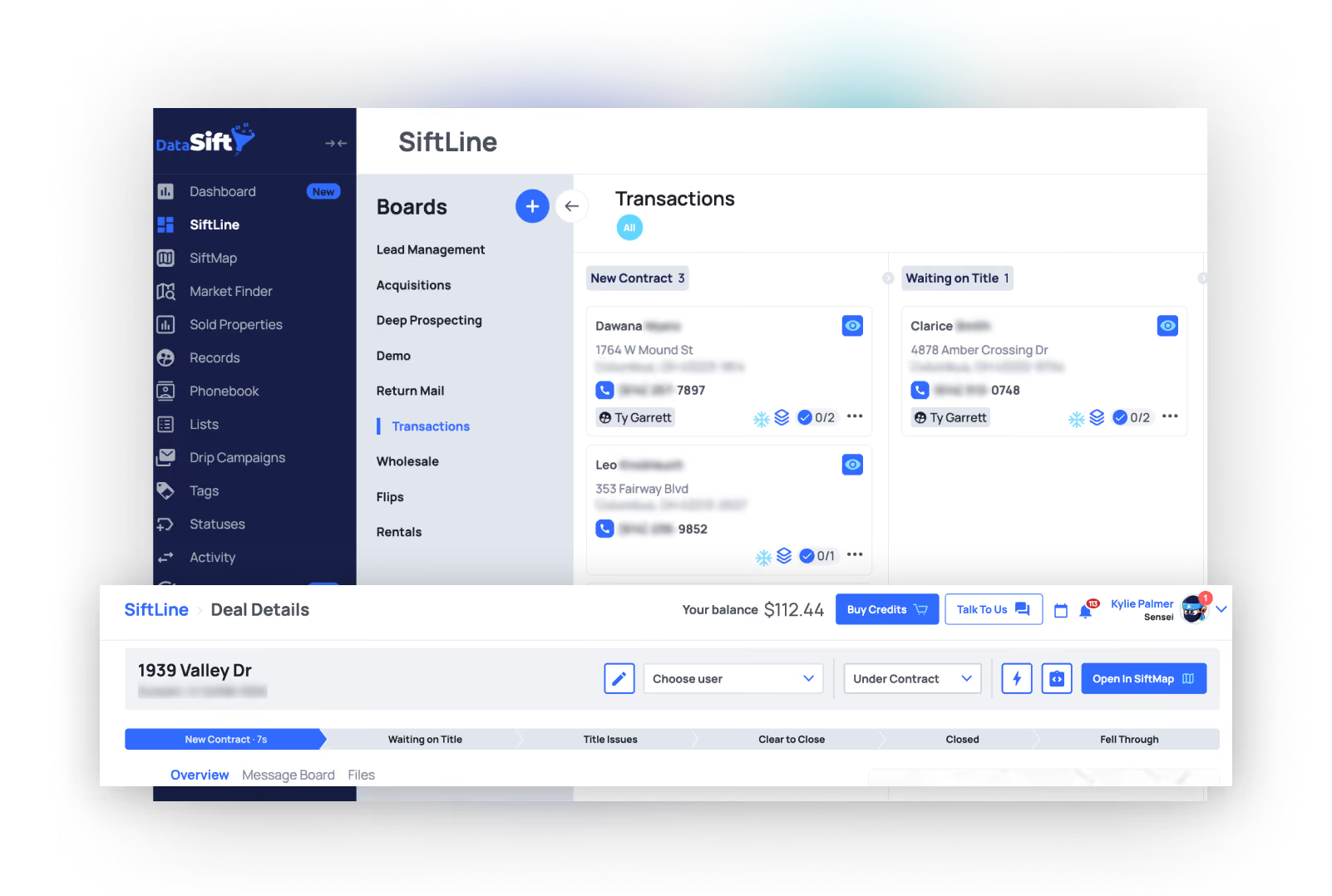
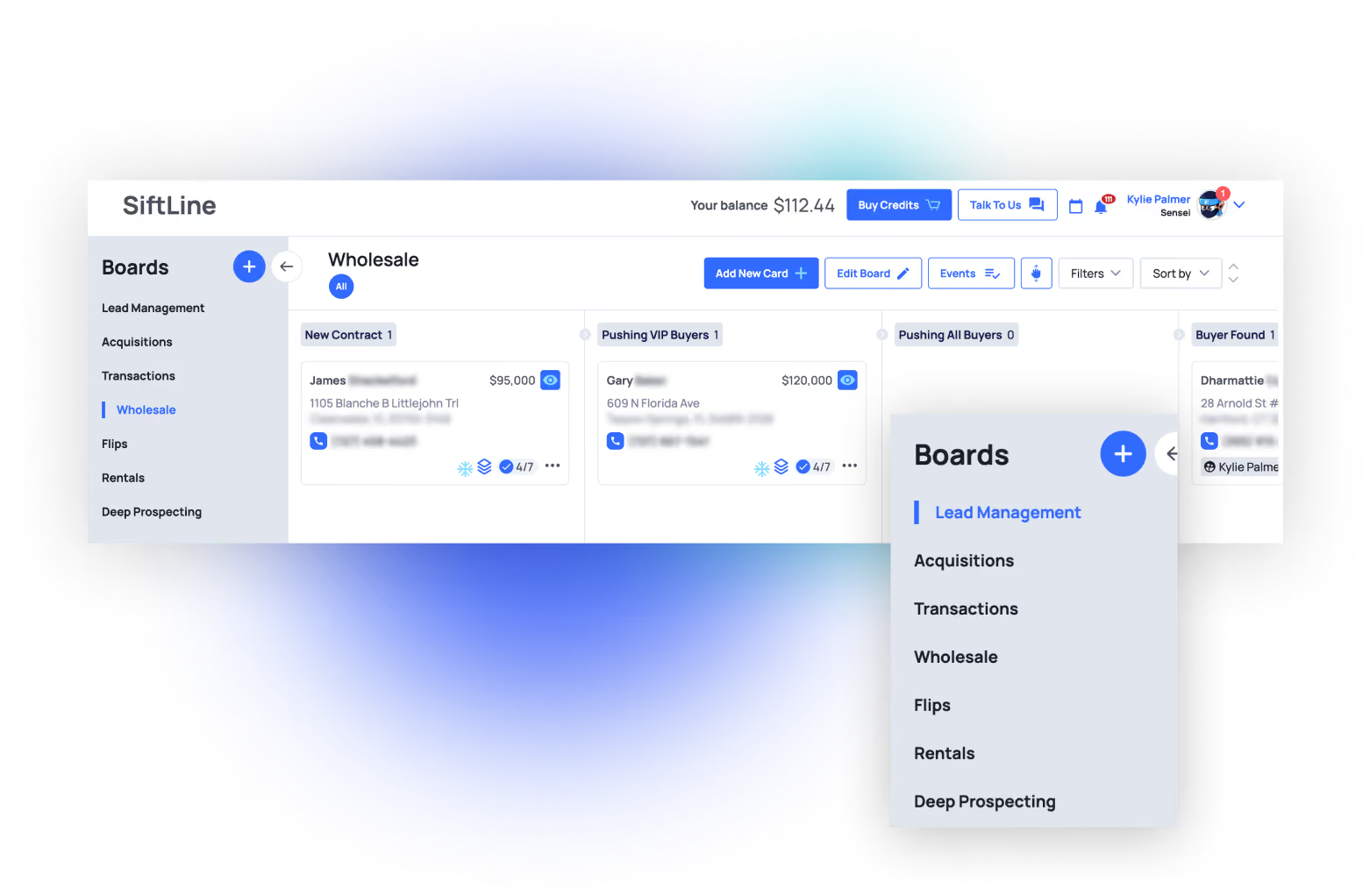
We are going to combine the transactions, wholesale, flips and rentals cards into just Siftline BoardSiftline is where your wholesale, flips and rental boards exist so you can see where every deal is in the dispo process.
Wholesale Board
Visual pipeline: Deal Arrives → Buyer Activating → Buyer Found → Assignment Signed → Closed. Sequences fire at every status change.
Flips Board
Visual pipeline: Deal Arrives → Scoping → In Rehab → Listed → Under Contract → Closed. Task presets built for each phase.
Rentals Board
Visual pipeline: Deal Arrives → Scoping → Rented → Occupied. PM contact, lease status, and cash flow tracked in custom fields.
Phone Book
Add in your buyers list and buyer info into the phone book.
Task Presets
Process Contract, Activate Buyers, Follow-Up Buyer, Execute Assignment, Rehab Scope, Rehab Check-In, Close and Log. The coordinator never decides what's next.
Sequences
Automations tool so you can automate your task creation and team member handoffs in the dispo process
Activity Log
Every call, offer, update, and status change stamped to the deal permanently. Full history from acquisition to close.
Custom Fields
Store specific info your business needs so every property, lead, and deal fits your process.
Dashboards
DataSift's KPI tracking tool so you can see everything going on in your company.
Property Statuses
Deal Arrives → Buyer Activating → Buyer Found → Assignment Signed → Under Contract → Closed → Fell Through. Every deal always has a status. Every status always has a next task.
Owner Records
Review the property owner to see if they have other properties in their portfolio that you may be able to acquire.
Dialer Integrations
Ready Mode, Smart Dialer, Call Tools, Smarter Contact, Kixie. Real-time disposition sync.
From the operators

Investors Using DataSift

Excellent
4.3 / 5
·
269 reviews on Trustpilot
269+ stories
“I just got DataSift. Our first mailer got 2 contracts. Which is great, very excited about the data.”
Justin F
New Sift User
“Deal Locked & Sold Same Day! Just wrapped up a wild one in PrP. Found this deal using First To Market targeting Lis Pendens.”
Kip M
Same Day Close
“Weekly Victory: We got a property under contract on Sunday and assigned it for a $27k projected profit. My stack is literally Sift + smrtPhone. That’s it.”
Mike A
Low overhead investor
“Closing our first FTM deal tomorrow! We began marketing FTM and adopted DataSift as our main CRM back in April. We have 4 other FTM deals under contract & a ton of momentum as we continue loading up our pipeline.”
Neil M
Investor gaining momentum
Coming from another company?

Most companies hand youan empty box. DataSift ships the box assembled.

You aren't just paying for a database. You're paying for a sales & marketing companythat can run your entire company.
"I came over from Podio. Best choice I ever made."
JD Monroe
"I moved over from Podio back in 2023. It's not ahard transition. Pretty simple."
Cesar Rios
Looks like we're getting off the Propstream bandwagon this week like everyone else... probably been 2 years since we've pulled more than 10k records off our account 🤣😅 Lets dive into these new Sift updates.
McKlane Bobbitt
With PropStream and REsimpli, I knew who I wanted to market to, but I didn't have an easy way to repeatedly market to them. I knew most sellers wouldn't respond to the first mailer, but consistently hitting them three or four times wasn't easy to manage.
Operator · GA

Common questions about Dispositions.

Real objections from real operators on real demo calls.
How does a deal get to dispositions?

The moment a contract is signed in Acquisitions, the record updates to Under Contract. That status change fires a sequence: the card moves to the Transactions Board, a Process Contract task is created and assigned to the Dispositions Coordinator, and the record is ready to route. The coordinator opens their task queue and it's already there.

What's the difference between the Transactions Board and the exit boards?

The Transactions Board is the hub — every contract lands there first. The coordinator reviews the deal, sets the exit type, and the card routes automatically. Wholesale, Flips, and Rentals each have their own phase columns and task presets built for that exit. The Transactions Board holds the Closed and Fell Through statuses — when a deal finishes, the card auto-removes from the active view.

What's the difference between the Wholesale, Flips, and Rentals boards?

Each board has its own phases and task presets. Wholesale moves through buyer activation, offer selection, and assignment. Flips move through scoping, rehab, and listing. Rentals move through scoping, tenant placement, and occupancy. Set the exit type and the card routes automatically.

How do I manage my buyers list?

Your buyers list is a pre-built list inside DataSift. Add buyers as records, tag them by buy box — market, price range, property type, cash or financed. When a wholesale deal is ready, filter by criteria, select the right buyers, and reach out directly from the record. Every conversation and offer logs on the deal.

How do I track profit across different exit types?

Every closed deal logs purchase price, total expenses, exit price or assignment fee, and net profit. Filter by exit type, month, or source list — no spreadsheet, no exporting. The data is on the record.

Can I run wholesale and flipping at the same time?

Yes. Both boards run independently inside the same account. Each has its own statuses, tasks, and sequences. One account, two pipelines, clean separation between them.

What happens to deals that fall through?

They update to Fell Through on the Transactions Board — the card auto-removes from the active view, a review task fires, and the record stays active. The seller is still in your account. Any future contact connects back to the original record. You never lose a deal. You sometimes lose the timing.

How do I know nothing is falling through the cracks?

Use the STAB-THEM check on every record: Status, Tasks, Assignee, Board, Messages. Run the Deals Missing Task filter daily — it surfaces every active deal without a next step. Every deal always has a status. Every status always has a next task.

How do I reverse engineer a closed deal?

Filter closed deals by source list, exit type, or marketing channel. Open any record and the full history is there — first marketing touch to closed exit. Days-to-close, profit, deal source, every step in between. That's your playbook for where to spend your next marketing dollar.

Won't this take weeks to set up?

No. Your account ships with all six SiftLine boards, task presets, sequences, and filter presets already wired. Learn the manual flow first — run deals step by step before leaning on automations. Once you understand each phase, the automations become something you earn. Most operators are running a live dispositions pipeline the same week they get in.