Use Case · Lead Management

How Marketing Campaigns Work Inside DataSift

Pull → skip → send. One tool. Lorem ipsum dolor sit amet, consectetur adipiscing elit, sed do eiusmod tempor incididunt ut labore et dolore magna aliqua. Ut enim ad minim veniam,

No exports. No spreadsheets. No "where did that one go."

How Leads Move Through DataSift

PPC, PPL, Direct Mail, Cold Calling, TV, SMS, Radio. All lead sources seamlessly connect in Sift.
1
Step 1
2
Step 2
3
Step 3
4
Step 4
5
Step 5
6
Step 6
STEP 01 / 06
Step 1
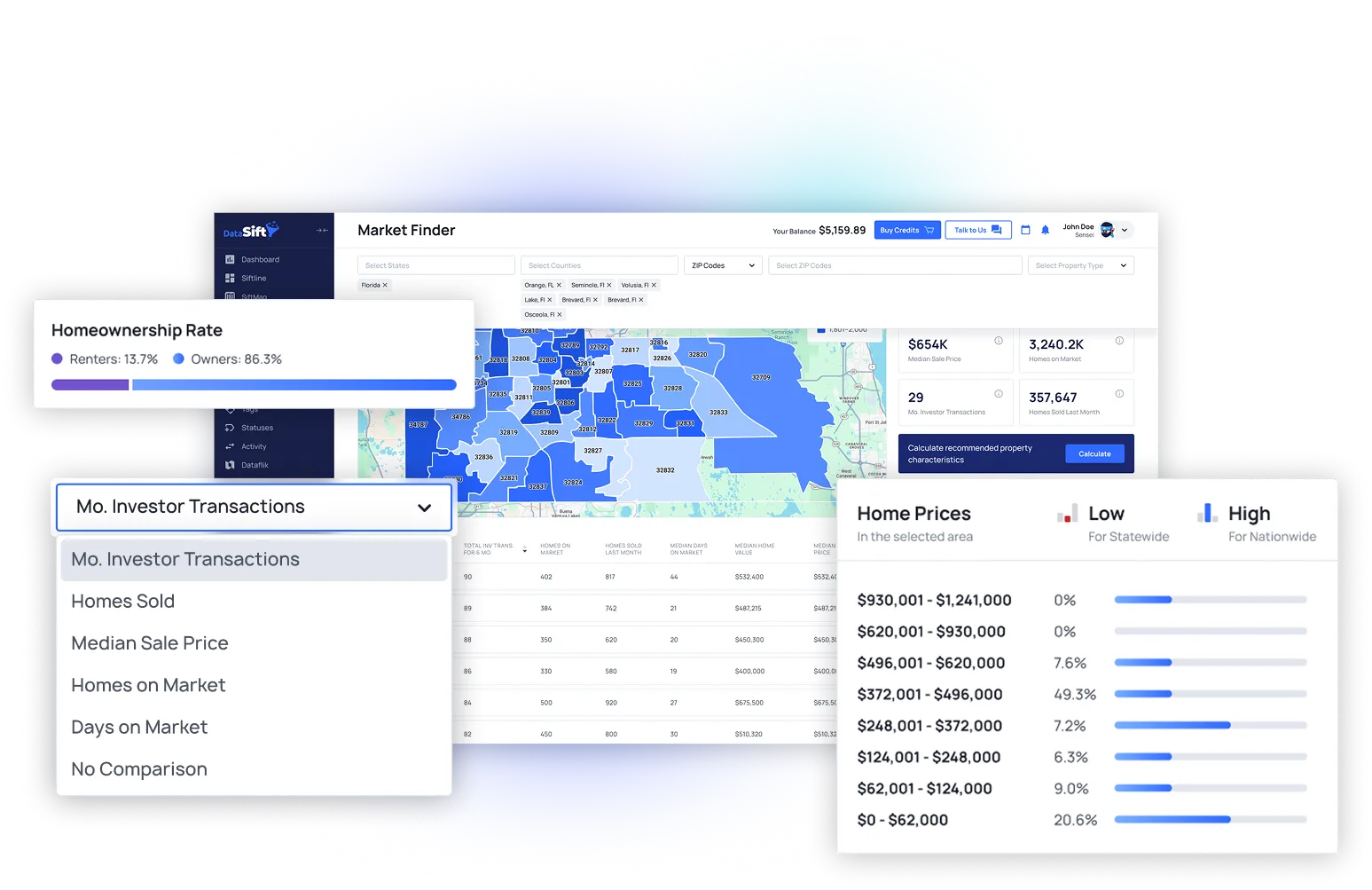
Market Finder
Start by selecting your state and county to see where investor activity is happening in your market.
Review the monthly investor transactions
Identify the ZIP codes and neighborhoods with the most investor activity.
Determine average days on market and median sales price
Validate those areas in Sold Properties to see what investors are buying.
Previous
Next step
STEP 02 / 06
Step 2
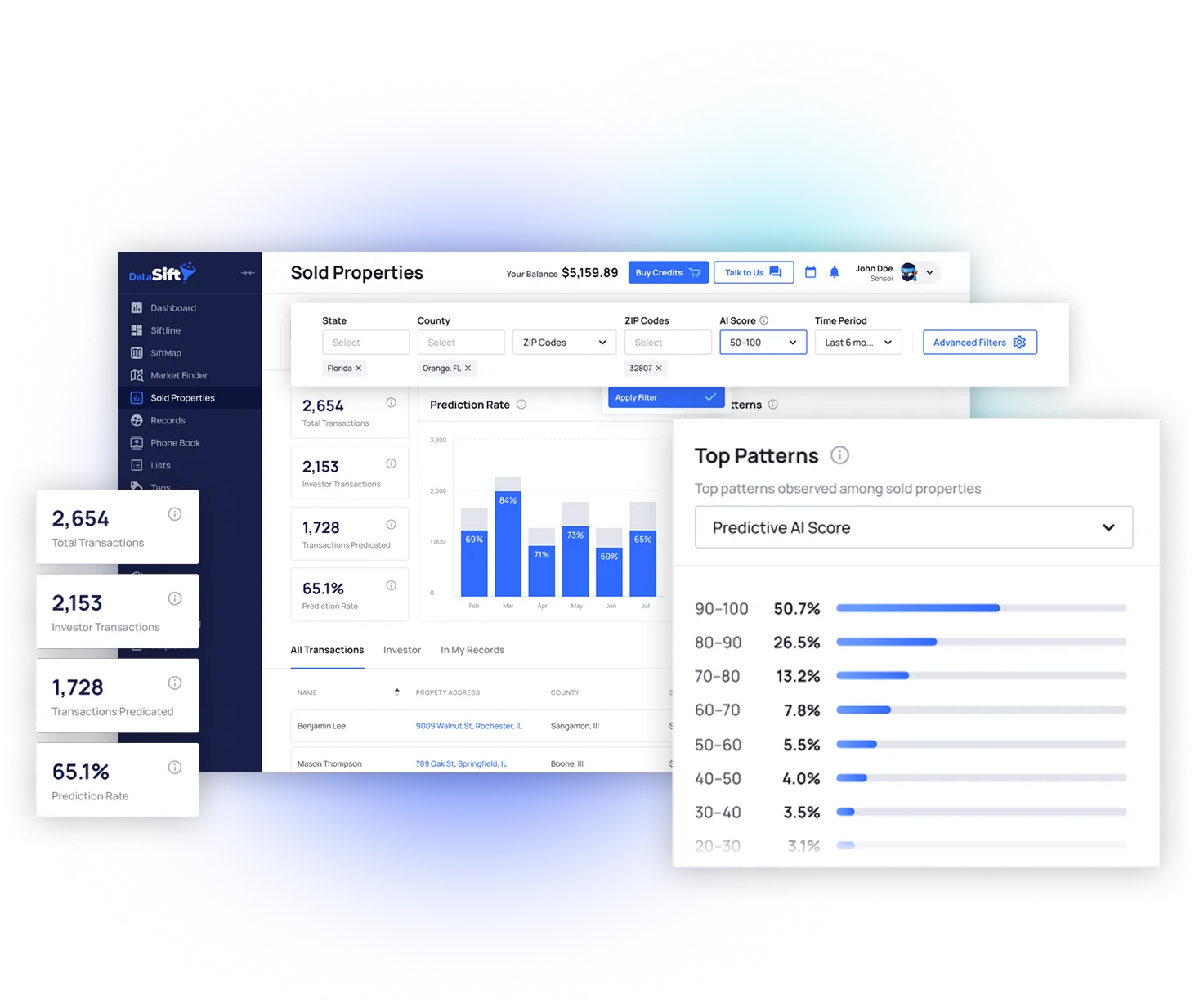
Properties
Punch in the market you analyzed with Market Finder
Set the "Time Period" to the last 6 months
Review the investor transaction volume as well as the AI Prediction Rate %
Review the Top Patterns drop down to see the top characteristics of properties selling in that area.
Inspect the deals selling and who's buying to finalize your buy box.
Use SiftMap to pull the strongest list identified in your analysis.
Previous
Next step
STEP 03 / 06
Step 3
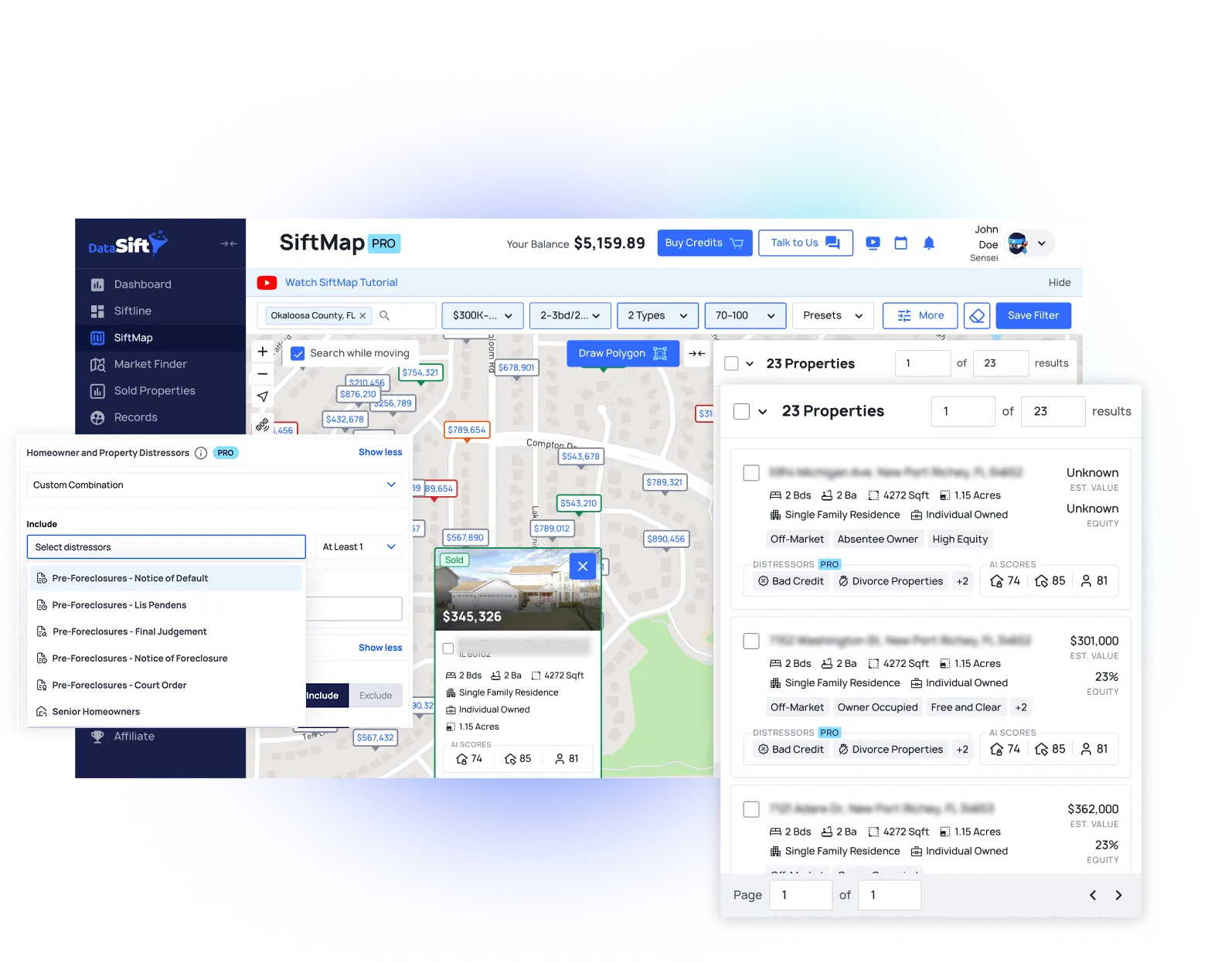
SiftMap
Take your market analysis into SiftMap to pull the exact list you found performs best.
Select the same county or neighborhood identified in your analysis.
Apply the AI score filter (50–100) to prioritize the highest-probability records.
Filter by property type and price range to match the buy box you identified.
Select all matching properties and upload to your Sift CRM to begin marketing.
Previous
Next step
STEP 04 / 06
Step 4
Gather Information
Get every number. Prioritize the right ones.
Upload your list to Sift. Upload via SiftMap or from a CSV file
DataSift automatically enriches all records upon upload. Property details, owner info, and system generated prospect lists like High Equity, Absentee, and Pre-Foreclosure are all applied the moment your data lands in your account.
Next DataSift automatically skiptraces every record upon upload if you have our unlimited skiptracing add on.
Once your lists are uploaded, enriched and skiptraced you are ready to start marketing.
Previous
Next step
STEP 05 / 06
Step 5
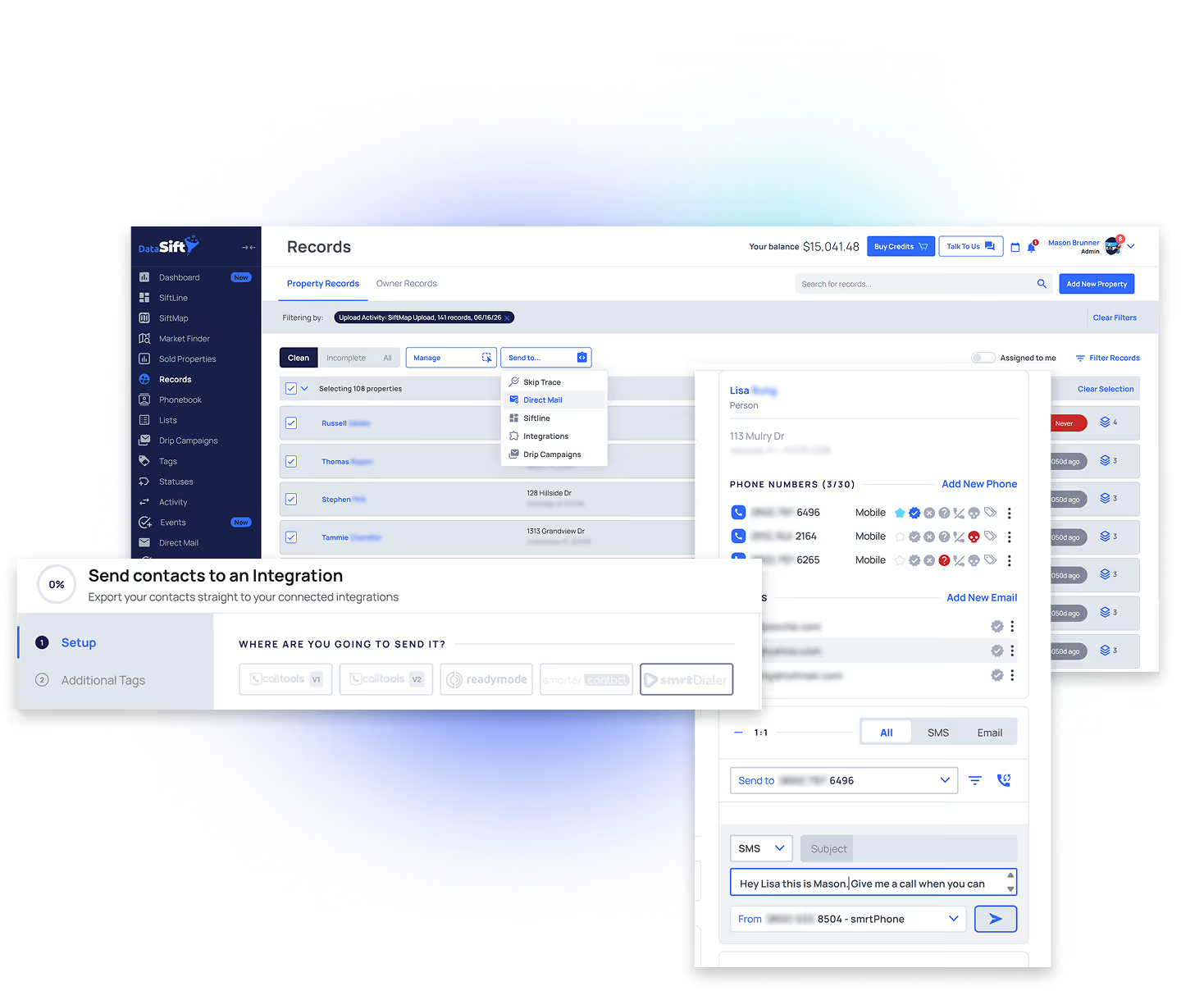
Execute Marketing
Once your list is skiptraced you can begin your marketing campaigns. Calling, SMS and Direct Mail can be done through Sift and our integration partners
Keep Phone Statuses up to date. Track whether a number is Correct, Wrong, No Answer, DNC, or Dead so you can focus on valid contact information and avoid wasted calls.
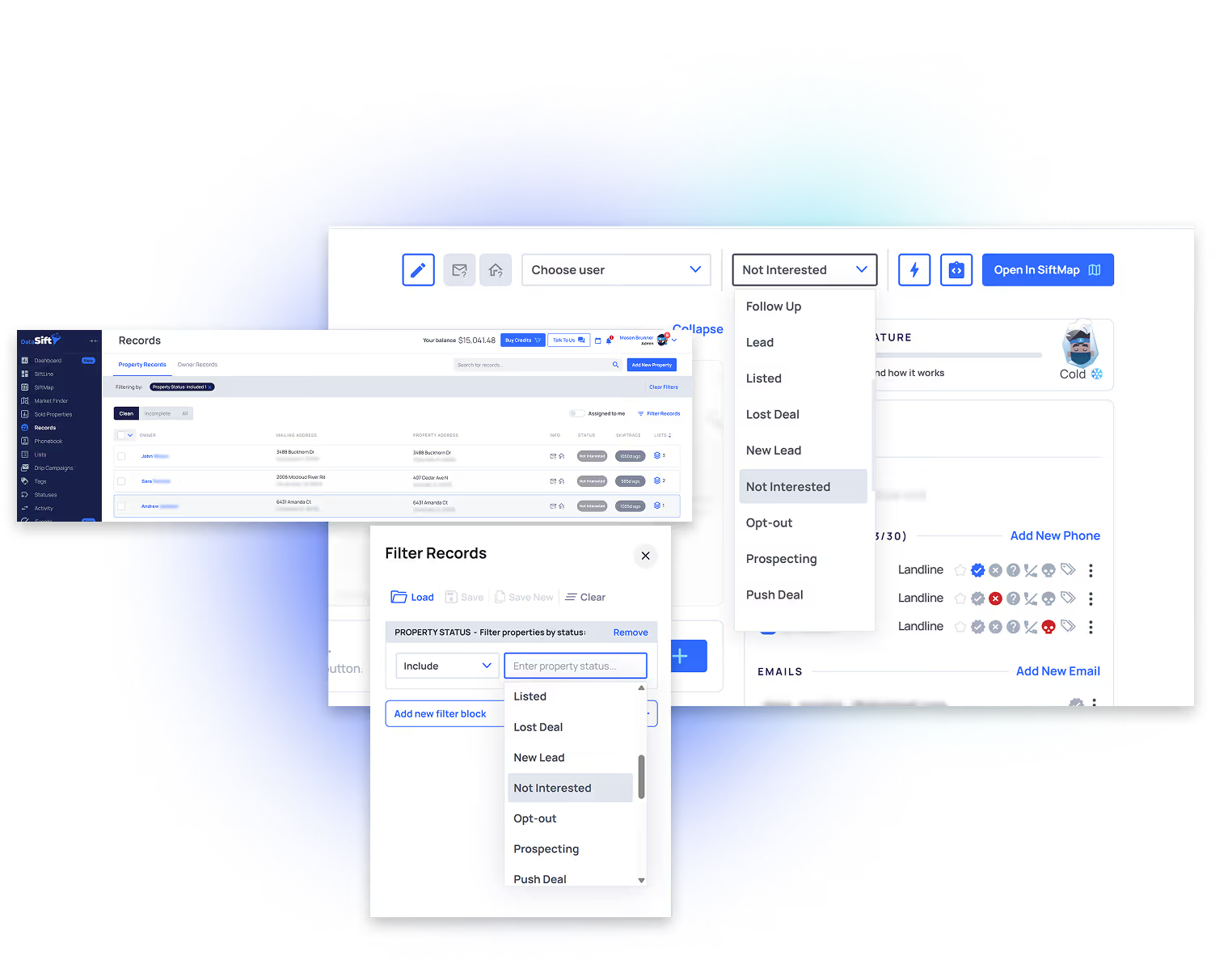
Property Statuses help you track where each property is in your marketing process and make it easy to find the records you need. Keep them clean.
Use DataSift's built in Direct Mail Center to design custom mail pieces that match your brand, schedule mailings, send campaigns in batches and create multi touch sequences.
Once your marketing generates a homeowner interested in selling, change your property status to new lead.
Previous
Next step
STEP 06 / 06
Step 6
Compound — Never Lose a Record
The database gets sharper every month. Old records become new deals.
What do you do with homeowners that weren't interested in selling?
If a homeowner isn't interested in selling right now, update their property status to "Not Interested".
On a recurring basis, filter for all of your not interested sellers and follow up with them to see if their situation has changed.
If they're interested in selling now, update the property status to "New Lead". If they're still not interested, follow up regularly until they are ready.
Previous
Next step

The Marketing Toolkit

These tools exist to make marketing clean, efficient and profitable. Using these will ensure your company is completely organized.
From the operators

Need To See Some Proof?

Excellent
4.3 / 5
·
269 reviews on Trustpilot
Long-tail follow-up pays
"Forgot to run our 'Not Interested' campaign in October. Finally ran it this month — BAM, locked one up from Lead to Under Contract in 30 minutes.$20K pop coming in."
Percy Yearleque
Quarterly rehash · $20K
40k in 5 days
"SIFT continues to help us stay consistent, organized and in business!! 40K in 5 days with the powers of follow up on Siftline board…"
Mara Garcia
Switched from Podio
Long-tail follow-up pays
"I did my first rehash campaign last month and got a contract. lol."
Christian Hernandez
First rehash · contract
$200K Single deal · probate
"Today we closed on a $200K profit FTM cold-call probate lead. Last Thursday, $83K from a direct-mail foreclosure deal. Gone through a lot of BS marketing/systems training — by far the best."
Aaron Sanchez
Cold caller · Florida
3 Deals/mo
"Right now it's just me and an admin VA. We're consistently closing 3 deals per month."
Kip McCray
Solo + 1 admin VA
Coming from another CRM?

Most CRMs hand youan empty box. DataSift ships the box assembled.

You're not paying for a database. You're paying forthe system that already runs your leadmanagement — boards, statuses, tasks, and 26+automations wired in.
Compare DataSift With Other CRMs
"I came over from Podio. Best choice I ever made."
JD Monroe
"I moved over from Podio back in 2023. It's not ahard transition. Pretty simple."
Cesar Rios
Looks like we're getting off the Propstream bandwagon this week like everyone else... probably been 2 years since we've pulled more than 10k records off our account 🤣😅 Lets dive into these new Sift updates.
McKlane Bobbitt
"Went from GHL to DataSift. My lead managerdoesn't open a spreadsheet anymore."
Operator · GA

Common questions about Lead Management.

Real objections from real operators on real demo calls. Short answers.
Does DataSift work with my dialer?

Yes. Ready Mode, Smart Dialer, Call Tools, and Smarter Contact connect directly. A wrong-number disposition in the dialer flips the phone to wrong-number in DataSift in real time. A new-lead disposition fires the full sales cycle. Other dialers can connect through CSV upload or Zapier.

I'm coming from Podio, REsimpli, or Go High Level. Why switch?

Every CRM needs someone to move leads where they belong. The difference is what catches the misses. Most CRMs hand you an empty box and tell you to build it. DataSift ships with the workflow assembled — boards, statuses, tasks, and 26+ automations already wired. You're not paying for a database. You're paying for the system that already runs your lead management.

I have too many leads. Don't I need drip campaigns for my warm and hot leads?

No. The Unqualified split (daily + weekly) is the fix. One lead manager can hold 600 to 800 qualified leads without dripping anyone out of the funnel. Drip campaigns are for ghosting leads and not-interested follow-up. Never for warm or hot. Warm and hot get a human call, every time, on a tempo set by when the seller will sign.

Won't I need to hire an acquisitions person to keep up?

Most operators give away 20% of their revenue solving an operational problem with a hire. A trained lead manager working the default build prevents that hire for a long time. Bring in an acquisitions specialist when your lead manager is buried in qualified follow-up that's converting — not before.

Will my team actually use this?

Your lead manager works six filters every day:

  1. Call New Leads
  2. Unqualified Overdue
  3. Unqualified Due Today
  4. Qualified Overdue
  5. Qualified Due Today
  6. Leads Missing Task

When all six are empty at end of day, the day is done. No guessing. No drowning. No leads sitting where they shouldn't.

What happens to leads we never reach?

They don't disappear. After 31 touches over six months, the lead moves to Ghosting. From there it gets swept every 45 days through a dialer or text campaign.

"For every hundred ghostings, I could probably pull another two deals at minimum a year out of them. That could be worth a hundred grand to my company every year."

You don't lose leads. You stop spending your lead manager's day on the ones who aren't talking back.

How long does setup take?

Your account ships with the lead management default build already wired. Boards, statuses, tasks, automations — ready on day one. Add your team, import your data, and your lead manager can start working leads the same afternoon.

Can I customize it?

Yes, but don't. Not at first. Run the default for 60 days. Prove your team has the discipline. Then extend. Most operators who break their CRM do it in the first 30 days by trying to make it "smarter."